Instagram often becomes more useful when you are away from home. It helps you follow local businesses, save travel ideas, share photos with family, and stay in touch with people across different time zones. On a Huawei phone, the best approach is to begin with an official source, finish the basic setup, and test the features you actually use before relying on the app every day.
Install Instagram from AppGallery
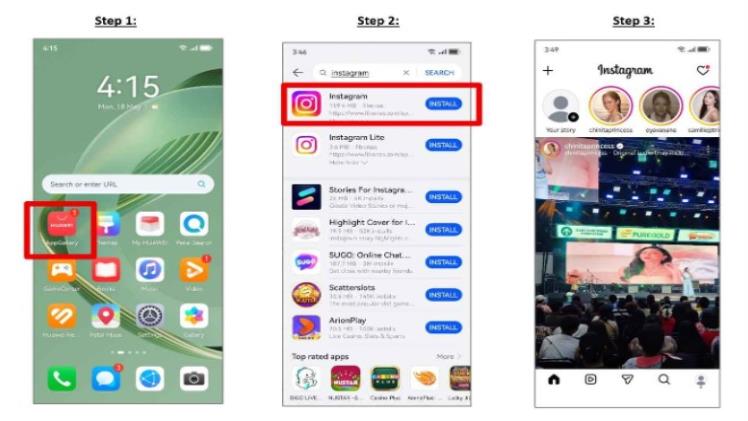
Open HUAWEI AppGallery and search for Instagram. Check the app name and publisher, then tap Install. Huawei’s community guide for huawei instagram presents this direct AppGallery route and also points users back to AppGallery when a later update is available.
The listing may differ by device, region, or software version. If Instagram does not appear, confirm that the country linked to your HUAWEI ID matches your current market. Update AppGallery and the phone software, restart the device, and search again. Avoid modified APK packages from unfamiliar sites, especially when the app will hold personal messages and account details.
Sign In and Check Essential Features
After installation, sign in on a trusted network and open the main parts of the app. Test the feed, Stories, Reels, direct messages, camera access, and one small photo upload. This quick check shows whether permissions and background settings are working properly.
For a smoother Huawei Instagram experience, allow camera and photo access only when needed. Choose which notifications matter instead of enabling every alert. If direct messages or comments arrive late, review the phone’s battery and background-app controls so Instagram is not closed as soon as you leave it.
Prepare the App for Overseas Use
Mobile data can disappear quickly when videos autoplay. Review Instagram’s data-use settings before travelling or switching to a limited local SIM. Upload important content over stable Wi-Fi and keep enough storage available for drafts, edited videos, and app updates.
Public Wi-Fi may be slow or require a browser sign-in page. If Instagram will not refresh, test mobile data before changing account settings. Also remember that music, shopping tools, and some content features may vary between countries.
Keep the Setup Simple
A reliable routine is straightforward: install from AppGallery, update from the same source, test core features, and adjust only the permissions you need. When the app behaves unexpectedly, restart it, check the network, and clear the cache before reinstalling.
For the original Huawei installation instructions, refer to the huawei instagram page and confirm that the steps apply to your device and region. This keeps the setup safe, maintainable, and easy to repeat after a phone update.